UseMealPlanner vs Plan to Eat: Which Meal Planner Fits Your Style?
A fair, detailed comparison of UseMealPlanner and Plan to Eat. Learn how AI recipe generation stacks up against recipe importing and calendar planning to find the right app for you.
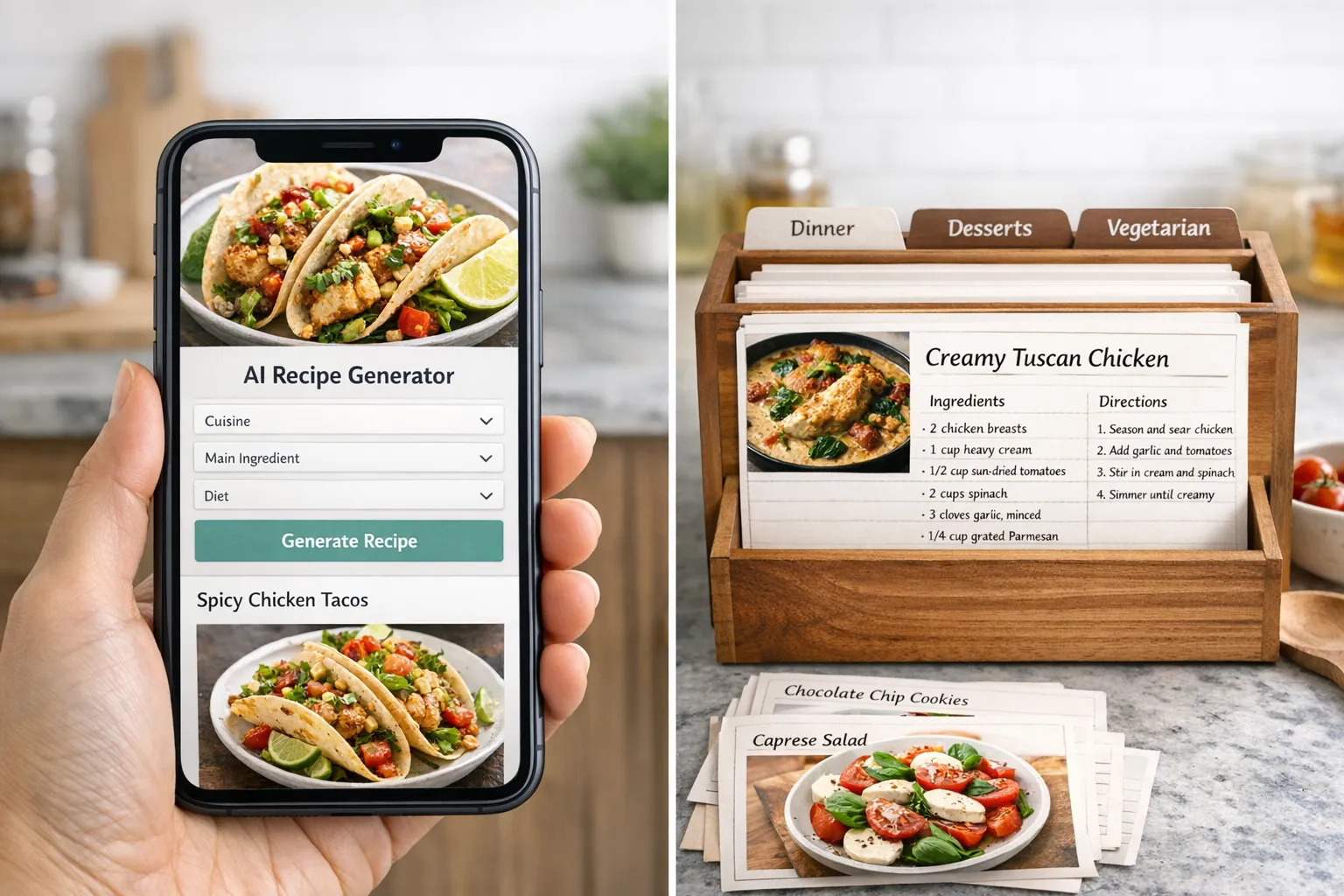
UseMealPlanner and Plan to Eat represent two very different philosophies about meal planning. Plan to Eat assumes you already have recipes you love, whether saved from food blogs, handed down from family, or clipped from cookbooks, and gives you a powerful system to organize them into weekly and monthly meal plans. UseMealPlanner assumes you want fresh ideas and uses AI to generate personalized recipes from scratch based on what you actually like to eat.
Both approaches work. Which one is better for you depends on how you think about cooking, how much time you spend finding recipes, and whether you want a planning tool or a recipe creation tool.
This comparison breaks down both apps across the features that matter most, so you can make a clear decision without signing up for something that does not fit your workflow.
The Fundamental Difference: Recipe Creation vs. Recipe Organization
Understanding this distinction will clarify almost every other comparison point between these two apps.
Plan to Eat is, at its core, a recipe organization and planning tool. Its signature feature is the recipe clipper, a browser extension and mobile tool that can import recipes from virtually any website on the internet. You save a recipe from a food blog, and Plan to Eat pulls in the title, ingredients, instructions, and photo automatically. Over time, you build a personal digital cookbook of every recipe you have ever found and liked.
From that personal library, you drag recipes onto a calendar-style planner. The calendar generates a shopping list based on whatever meals are scheduled. It is a manual process, but the tools to execute it are excellent. Plan to Eat has refined this workflow over many years, and the recipe import and calendar features are among the best in the meal planning category.
UseMealPlanner skips the collection and curation step entirely. Instead of importing recipes from external sources, the AI generates original recipes tailored to your preferences. You specify your dietary needs, cuisine preferences, and how many meals you want, and the app creates a complete meal plan with unique recipes you have never seen before.
This means you do not need to spend time browsing food blogs, scrolling through Pinterest, or searching for recipes that match your dietary restrictions. The AI handles the discovery and creation in one step. The tradeoff is that you are getting new, AI-generated recipes rather than proven recipes from established food writers, though the AI quality has improved substantially and generates practical, well-structured meals.
Ready to simplify your meal planning?
Join UseMealPlanner and get AI-generated recipes tailored to your preferences, dietary needs, and schedule.
Download the AppFeature-by-Feature Breakdown
| Feature | UseMealPlanner | Plan to Eat |
|---|---|---|
| AI Recipe Generation | ||
| Recipe Import from URL | ||
| Drag-and-Drop Calendar | ||
| Personalized Meal Plans | Manual | |
| Grocery List Generation | ||
| Free Cooking Tools | ||
| Ingredient Scaling | ||
| Family Sharing | Recipe sharing | |
| iOS App | ||
| Android App | Web + iOS | |
| Free Tier | 14-day trial | |
| Pricing Model | Pay-per-use | $5.95/month |
| Recipe Tagging/Organization | ||
| Pantry Tracking |
Meal Planning Workflow
The daily experience of using these apps is very different.
With Plan to Eat, your typical workflow looks like this: throughout the week, you save recipes you find online using the clipper. On your planning day, you open the calendar view, browse your saved recipes, and drag them onto specific days. The app generates a shopping list from the planned meals. You can plan days, weeks, or even months in advance. The calendar is flexible, and moving meals around is as simple as dragging them to a different day.
This workflow rewards people who enjoy browsing recipes and have strong opinions about what they want to cook. If you are the kind of person who has 200 bookmarked recipes across various food blogs, Plan to Eat gives you a way to actually use them instead of letting them sit in forgotten browser tabs.
With UseMealPlanner, the workflow is faster but different. You set your preferences once, then generate a meal plan whenever you need one. The AI produces a complete set of recipes with ingredients and instructions. You review the plan, and you are ready to cook. There is less planning overhead because the AI is making the recipe selection decisions for you.
This workflow suits people who find recipe selection to be the hardest part of meal planning. If you have ever stood in front of your fridge thinking "I have no idea what to make," UseMealPlanner eliminates that decision fatigue by generating options tailored to your tastes.
Recipe Quality and Variety
Plan to Eat does not create recipes; it stores the ones you find. This means recipe quality is entirely in your hands. If you save recipes from reliable food blogs and tested sources, your Plan to Eat library will be excellent. If you save untested recipes from random websites, results will vary. The advantage is that you can build a collection of recipes you have personally verified and loved.
UseMealPlanner generates recipes using AI, which means every recipe is original. The AI creates practical, home-cook-friendly recipes with clear ingredient lists and step-by-step instructions. The quality is generally strong, and the personalization means the recipes match your preferences closely. The variety is essentially unlimited because the AI can generate new combinations every time.
For users who have spent years building a recipe collection, Plan to Eat respects and leverages that investment. For users who want fresh ideas without the research work, UseMealPlanner's generation approach saves significant time.
Grocery Lists and Shopping
Both apps generate grocery lists, but the implementation differs.
Plan to Eat's shopping list is generated from your planned calendar meals. It consolidates ingredients across multiple recipes, organizes them by category, and lets you check items off as you shop. You can also add non-recipe items to the list manually. The list is comprehensive and well-organized, reflecting Plan to Eat's years of refinement.
UseMealPlanner generates ingredient information within each recipe. The app's strength on the shopping side is its ingredient scaling tool, which lets you adjust quantities if you are cooking for more or fewer people than the recipe assumes. If a recipe calls for an ingredient you do not have, the ingredient substitution finder can suggest alternatives without requiring a separate trip to the store.
Plan to Eat has the more sophisticated shopping list feature. UseMealPlanner compensates with tools that help you adapt what you buy and how much you need.
Pricing
This is a significant difference between the two apps.
Plan to Eat costs $5.95 per month or $49.95 per year. There is a 14-day free trial, but no permanent free tier. After the trial, you need a paid subscription to use any features. For users who meal plan consistently, the annual price works out to about $4.16 per month, which is reasonable for the feature set.
UseMealPlanner offers a free tier that lets you try the app without a credit card. Paid plans follow a pay-per-use model: $10 for 100 AI-generated meals or $25 for 500 meals. This means you only pay when you actively generate new meal plans. During weeks when you do not need new recipes, there is no cost.
For someone who meal plans 52 weeks a year, Plan to Eat's annual cost is predictable and straightforward. For someone who meal plans inconsistently, or who generates a batch of recipes and rotates through them for a while, UseMealPlanner's pay-per-use model can be significantly cheaper.
Tip
If you are trying to reduce your grocery bill, pair either app with strategic planning. Our weekly budget meal plan for a family of four shows how thoughtful meal planning can keep your grocery costs between $75 and $100 per week regardless of which app you use.
Cooking Tools and Extras
Plan to Eat focuses tightly on its core features: recipe storage, calendar planning, and shopping lists. It also includes pantry tracking, which lets you mark ingredients you already have so the shopping list only shows what you need to buy. Family sharing lets multiple household members access the same account, view the plan, and contribute to the shopping list.
UseMealPlanner supplements its meal planning with a set of free cooking tools that work independently:
- Recipe Scaler: Scale any recipe up or down instantly
- Unit Converter: Convert between cups, grams, ounces, tablespoons, and more
- Ingredient Substitution Finder: Find reliable swaps for missing ingredients
- Cooking Time Converter: Adjust cooking times between ovens, air fryers, and other appliances
These tools are free to use without an account, which makes UseMealPlanner useful even if you are not using it as your primary meal planner. Plan to Eat does not offer equivalent standalone tools.
Free Tool
Kitchen Unit Converter
Convert between any cooking measurements instantly with our free tool.
Family and Sharing Features
Plan to Eat has an advantage here with its built-in family sharing. Multiple household members can log into the same account, view the meal plan calendar, add to the shopping list, and save recipes. This is particularly useful for households where more than one person is involved in cooking and grocery shopping.
UseMealPlanner supports recipe sharing, which lets you send generated recipes to family members or friends. However, it does not currently offer the kind of multi-user collaborative planning that Plan to Eat provides.
For families where multiple people actively participate in meal planning decisions and grocery shopping, Plan to Eat's sharing model is more developed. For households where one person handles the planning and shares the results, UseMealPlanner's sharing features are sufficient.
Platform Availability
Plan to Eat is available on iOS, Android, and the web, with apps that sync seamlessly across all platforms. The mobile apps are well-designed and functional, making it easy to access your meal plan and shopping list on the go.
UseMealPlanner is available on the web and iOS. The web interface is responsive and works well on mobile browsers, and the dedicated iOS app provides a native mobile experience. Android users can access the full-featured web app through their mobile browser.
Real-World Scenarios
You already have a large recipe collection
If you have been saving recipes from food blogs, cookbooks, and cooking magazines for years, Plan to Eat is the natural choice. Its recipe import feature will pull all those saved recipes into one organized library, and the calendar makes it easy to turn that collection into actionable weekly plans. Your investment in finding great recipes is preserved and made more useful.
You are starting fresh and want personalized ideas
If you do not have an existing recipe collection or you are tired of eating the same things, UseMealPlanner lets you start immediately with AI-generated recipes tailored to your preferences. There is no need to spend hours browsing food blogs before you can start planning.
You plan meals for the whole month
Plan to Eat's calendar view is designed for long-range planning. You can see weeks and months at a glance, drag recipes around, and plan ahead for holidays, events, and busy periods. UseMealPlanner is optimized for generating individual meal plans rather than long-term calendar-based planning.
You want cooking help beyond just planning
If you regularly need to scale recipes, convert units, or find ingredient substitutions while cooking, UseMealPlanner's free tools add genuine value that Plan to Eat does not match. If you have ever been halfway through a recipe and realized you do not have an ingredient, the substitution finder solves that problem instantly.
You need the whole family involved
If your household has multiple cooks who share planning responsibilities, Plan to Eat's family sharing gives everyone access to the same plan and shopping list. This is particularly valuable for families with older children who cook, or couples who split meal preparation duties.
You meal plan inconsistently
If you go through phases of meal planning, sometimes planning every week, sometimes going a month without a plan, UseMealPlanner's pay-per-use pricing is more economical. You are not paying $5.95 per month during the months you skip. Plan to Eat's subscription runs regardless of whether you use it.
Can You Use Both?
Yes, and some people do. A practical combination is to use Plan to Eat as your recipe library and long-term calendar planner while using UseMealPlanner when you want fresh AI-generated ideas or need the free cooking tools. The apps do not conflict because they solve different parts of the cooking workflow.
UseMealPlanner's tools are free and do not require switching away from Plan to Eat. You can continue using Plan to Eat for your core planning while using the recipe scaler or cooking time converter whenever you need them.
Who Should Choose Which
Choose UseMealPlanner if you:
- Want AI to generate personalized recipes instead of searching for them yourself
- Are new to meal planning and do not have an existing recipe collection
- Prefer pay-per-use pricing over monthly subscriptions
- Want free cooking tools like recipe scaling, unit conversion, and ingredient substitution
- Value personalization and variety over manual control
Choose Plan to Eat if you:
- Already have a large collection of recipes from websites and other sources
- Want a drag-and-drop calendar for long-term meal planning
- Need robust family sharing for multiple household members
- Prefer to select your own recipes from a curated personal library
- Want pantry tracking to streamline your shopping lists
Both apps are well-built and effective. Plan to Eat is the stronger choice for recipe collectors and long-term planners who want full control over their meal calendar. UseMealPlanner is the stronger choice for people who want AI-powered personalization, fresh recipe ideas, and a toolkit that extends beyond planning into everyday cooking.
If you are not sure which approach suits you, the best strategy is to try both. Plan to Eat offers a 14-day free trial, and UseMealPlanner has a free tier with no time limit. You might find that one approach clicks immediately, or you might discover that using both gives you the best of both worlds. For a broader look at what else is available, see our comparison of the best AI meal planning apps in 2026.
Free Tool
Recipe Scaler
Adjust any recipe to match your household size instantly with our free calculator.
Key Takeaway
Plan to Eat and UseMealPlanner serve different types of cooks. Plan to Eat excels at organizing existing recipes with its best-in-class URL importer, drag-and-drop calendar, and family sharing features, making it ideal for recipe collectors and long-term planners. UseMealPlanner generates unique, personalized recipes using AI and offers free cooking tools like recipe scaling and ingredient substitution, making it ideal for people who want fresh ideas without the research work. Plan to Eat costs $5.95/month with no free tier, while UseMealPlanner offers a free tier and pay-per-use pricing starting at $10 for 100 meals.